



A website serves as the virtual storefront for businesses, especially for e-commerce and online service providers, and it is very important for that storefront to be in tip-top shape. After creating a website, one of the things I try my best to explain to clients is the importance of maintaining it.
Since a website is not only a tool for sharing information but also a platform for engaging with customers, building brand awareness, generating leads and driving sales, you want to be sure that everything, and everyone’s data, is protected. This is where website maintenance comes in, particularly for WordPress-based websites.
Understanding the structure of a website
A modern website’s structure is primarily composed of two key components: files and a database. The files include HTML, CSS, JavaScript, images and other assets that define the website’s design and functionality. These files are stored on a web server and are responsible for the visual and interactive elements that users see and interact with. The database, on the other hand, stores dynamic content such as user information, posts, comments and other data that the website needs to function.
The files and the database work together to deliver a seamless experience. When a user visits a website, the server processes the request, retrieves the necessary data from the database, and uses the files to display the content in the user’s browser. This dynamic interaction is crucial for the functionality of modern websites, especially those with user-generated content or e-commerce capabilities.
One of the most popular website platforms (or content management systems, CMS for short) is WordPress, which powers around 41% of all websites globally and close to 59% of the websites built on a recognizable CMS. It uses a combination of files and a database to provide a flexible and powerful platform. At the core of WordPress are themes and plugins, which allow for extensive customization and functionality. But in order for them to work properly and keep your data safe, they need regular updates and backups.
The components of a WordPress website
A WordPress website consists of several essential components that work together to provide a functional, attractive and secure online presence:
- WordPress core – the foundational software that powers the website. It includes the core PHP files that handle the functionality and logic of the site, a MySQL database that stores all dynamic data such as posts, comments and user information, and various JavaScript and CSS files that manage the site’s appearance and interactivity.
- Themes – they determine the overall design and layout of the website. They are essentially templates that control how the website looks and feels, and they can be customised to match the branding of the site owner. However, themes need to be regularly updated to stay compatible with the latest version of WordPress and to take advantage of new features and security improvements.
- Plugins – extensions that add specific features and functionality to a WordPress site. From SEO tools to e-commerce capabilities, plugins let you enhance your website without writing custom code. Like themes, plugins require regular updates, so they keep working correctly with the latest WordPress version and so that any security vulnerabilities get patched.
- Widgets and menus – used to add content and navigation to the sidebar, the footer and other areas of the site. Widgets can include elements like recent posts, search bars and social media links, while menus give visitors a structured way to browse the site.
- Media library – it stores all the images, videos and other media files uploaded to the site. Keeping this library organized and optimized makes sure that media content loads quickly and efficiently.
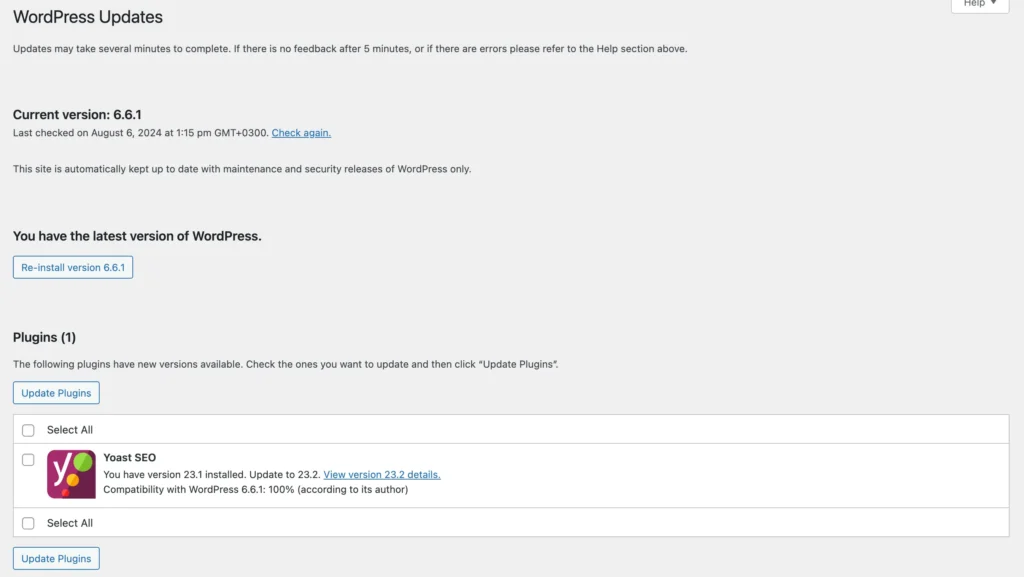
Keeping WordPress, its themes and its plugins updated is crucial for several reasons. First and foremost, updates often include security patches that protect the site from vulnerabilities and potential attacks. Updates can also improve performance, fix bugs and introduce new features that make the site nicer to use. Failing to keep these components updated can result in compatibility issues, reduced performance and an increased risk of security breaches.
Why WordPress needs regular maintenance services
The user-friendly interface, the extensive plugin library and the customizable themes make WordPress a preferred choice for many businesses looking to create and manage a website. However, this popularity also makes it a target for cyber-attacks, and its extensive functionality means that regular maintenance is crucial to keep the site running smoothly and securely.
1. Security vulnerabilities: with great popularity comes great responsibility. WordPress websites are often targeted by hackers precisely because they are so widespread. Regular maintenance makes sure your site is protected against the latest threats by keeping the core software, the themes and the plugins up to date.
2. Performance optimization: over time, a website can accumulate a lot of unnecessary data, which slows it down. Regular maintenance includes cleaning up that data, optimizing the database and making sure the site loads quickly.
3. SEO improvements: search engines tend to reward sites that load quickly, stay online and have not been compromised, and regular maintenance is what keeps all three of those true.
4. User experience: a well-maintained website is simply nicer to use. Regular updates and optimizations keep the site friendly, which usually leads to more engagement and better conversion.
5. Cost-effectiveness: preventative maintenance saves money in the long run. By looking after the site regularly you avoid the major problems that are expensive to fix. Think of it as an investment in the long-term health of your online presence.

Learning from the mistakes of others
It is often more effective to learn from the mistakes of others than to make those mistakes yourself. Whether it is a security breach caused by outdated plugins, a drop in performance from neglected updates or lost data from inadequate backups, other people’s experiences can be a very good guide. Here are some of the situations I have come across that could easily have been prevented:
- Security breach due to outdated theme: A security breach caused by an outdated theme resulted in hackers holding the website for ransom.
- Revenue loss from neglecting plugin updates: By neglecting updates for a specific payment plugin, a client discovered that the website hadn’t been processing payments for the past four months, leading to significant revenue loss.
- Immediate increase in views after design and content update: After years of neglecting design and content updates, a client finally revamped the website and saw an immediate increase in views and search lead page visits.
- Data loss from lack of regular backups: Failing to back up the website regularly, a client lost all their data due to a server crash, resulting in extensive downtime and the costly process of rebuilding the site from scratch.
- Reputation damage from ignoring security updates: By ignoring a critical security update for a popular plugin, a client’s website was compromised, leading to the website to show a malware alert and causing significant damage to their reputation.
- Drop in traffic due to poor performance: After postponing regular performance optimizations, a client’s website became exceedingly slow, frustrating visitors and causing a noticeable drop in traffic and customer engagement.

What a good maintenance package covers
A robust maintenance services package is essential for the smooth operation of your WordPress site. Here are the things I consider key components of a comprehensive maintenance service:
- Technical support, so that you have someone to ask when something goes wrong. Whether it is a small glitch or a real problem, knowing that help is a message away is worth a lot.
- Monthly updates for WordPress and for the installed plugins, which keep the site protected and runs on the latest, most efficient software.
- Urgent updates when a security threat appears, because some vulnerabilities cannot wait for the monthly round.
- Minor content changes, because keeping your content current matters both for search engines and for the people reading it. Major overhauls are a separate job, but small updates keep the site accurate.
- Monthly backups of the site and the database, so that if something goes wrong there is a recent copy to restore from. If your site takes orders or bookings, it is worth talking about a shorter interval than a month.

Benefits of regular maintenance services
1. Security: Regular maintenance significantly reduces the risk of your site being compromised. This includes updating software to patch vulnerabilities, implementing security measures, and monitoring for suspicious activity.
2. Performance: A well-maintained site performs better, with faster load times and fewer errors. This leads to a better user experience and can positively impact your site’s search engine ranking.
3. SEO: Search engines prefer sites that are well-maintained. Regular updates and performance optimizations can help improve your site’s SEO, leading to higher visibility and more organic traffic.
4. User experience: A seamless user experience is critical for retaining visitors and converting them into customers. Maintenance services ensure that your site is always in top shape, providing a smooth and enjoyable experience for your users.
5. Cost-effectiveness: By addressing potential issues before they become major problems, regular maintenance can save you money in the long run. It’s a proactive approach that helps avoid costly repairs and downtime.
Why I offer 30 days of free maintenance
To ensure that your project has a smooth start, I offer 30 days of free maintenance to clients. This period is crucial for ironing out any initial issues and ensuring that your new site is running optimally. During these 30 days you get everything a full maintenance package includes: technical support, updates, backups and minor content changes.
And, to make the transition as smooth as possible, I follow a structured handover process:
- A final review meeting before the handover, where we go through every part of the website together and deal with any last changes or requests.
- Video training that covers the essentials of running your website: navigating the WordPress dashboard, managing and updating content, installing and updating plugins, and keeping good security habits.
- Detailed documentation, upon request, explaining how your website works, with step-by-step guides for managing content, updating plugins and using the various features.
- Thirty days of support and maintenance, during which you can reach me by email, phone or WhatsApp with any question or problem you run into.
This free maintenance period is designed to give you peace of mind and demonstrate the value of regular maintenance services. After seeing the benefits first-hand, many clients choose to carry on with a subscription.

Continuous support and customisation
An ongoing maintenance package keeps your site looked after and secure month after month. After years of testing, the subscriptions I offer are flexible, so you can choose the level of support that suits you.
In addition to the standard maintenance services, you can also add customized services to your package. This includes additional hours of programming for more complex updates and enhancements, as well as extra hours for content changes. The subscription plans typically include:
- Regular updates: Monthly updates for WordPress core, themes, and plugins to ensure compatibility and security.
- Website backups: Scheduled backups to safeguard your data and facilitate quick recovery in case of any issues.
- Performance monitoring: Continuous monitoring to ensure your website runs efficiently and swiftly, including performance optimizations as needed.
- Security audits: Routine security audits to identify and address potential vulnerabilities.
- Technical support: Ongoing technical support for any operational issues or queries you might have.
- Content updates: Minor content modifications as required to keep your site relevant and updated.
To sum it all up, taking a proactive approach to website maintenance gives you the peace of mind that comes with knowing your site is being looked after. It is not a way for us programmers to try to get more money from our clients, it is a way to keep your website, its data and its information protected and working for years to come. Investing in regular maintenance is a smart choice that pays off in a secure, fast and pleasant online presence.



One Comment